'%3e%3cpath%20fill-rule='evenodd'%20clip-rule='evenodd'%20d='M0%2062.3176C0%2027.9001%2027.8995%200.00181961%2062.3134%200.00181961L62.3999%2062.2311C62.3999%2096.6462%2034.5004%20124.544%200.0852901%20124.544'%20fill='%233A3D3C'/%3e%3c/g%3e%3cpath%20d='M62.3994%2062.2461V0C96.8133%200%20124.713%2027.8982%20124.713%2062.3158'%20fill='url(%23paint0_linear_6331_3458)'/%3e%3cpath%20fill-rule='evenodd'%20clip-rule='evenodd'%20d='M45.617%2026.2827C47.7276%2026.2827%2049.4382%2027.9933%2049.4382%2030.1052C49.4382%2032.2146%2047.7276%2033.9252%2045.617%2033.9252C43.5064%2033.9252%2041.7958%2032.2146%2041.7958%2030.1052C41.7958%2027.9933%2043.5064%2026.2827%2045.617%2026.2827Z'%20fill='%23F9F6EF'/%3e%3cpath%20fill-rule='evenodd'%20clip-rule='evenodd'%20d='M45.6168%2045.2338C37.2596%2045.2338%2030.4857%2038.461%2030.4857%2030.1038C30.4857%2021.7454%2037.2596%2014.9702%2045.6168%2014.9702C53.9753%2014.9702%2060.7492%2021.7454%2060.7492%2030.1038C60.7492%2038.461%2053.9753%2045.2338%2045.6168%2045.2338ZM45.6168%2012.6686C35.9875%2012.6686%2028.1816%2020.4744%2028.1816%2030.1038C28.1816%2039.7308%2035.9875%2047.5378%2045.6168%2047.5378C55.245%2047.5378%2063.0508%2039.7308%2063.0508%2030.1038C63.0508%2020.4744%2055.245%2012.6686%2045.6168%2012.6686Z'%20fill='%23FECE01'/%3e%3cdefs%3e%3clinearGradient%20id='paint0_linear_6331_3458'%20x1='62.2719'%20y1='4.01754'%20x2='108.703'%20y2='70.5262'%20gradientUnits='userSpaceOnUse'%3e%3cstop%20stop-color='%239ED5CB'/%3e%3cstop%20offset='1'%20stop-color='%23FCE18E'/%3e%3c/linearGradient%3e%3c/defs%3e%3c/svg%3e)
EmbedAuthenticationHow to
Generate a sandbox token
Sandbox tokens in Toucan AI let you test and validate your embedded analytics in a safe, controlled environment—before rolling out to production.
Objective
In this tutorial, you will learn how to generate a sandbox token in Toucan AI. Sandbox tokens allow you to test embedding your visualizations and dashboards in a controlled environment before using them in production.
Prerequisites
- A Toucan AI account.
- An API key (as seen in the previous tutorial on how to generate a sandbox API key).
Steps
1. Access the Settings Menu
- From the main interface, click on the Settings button in the menu.
2. Navigate to the Embed Tab
- In the Settings menu, click on the Embed tab to access token generation settings.
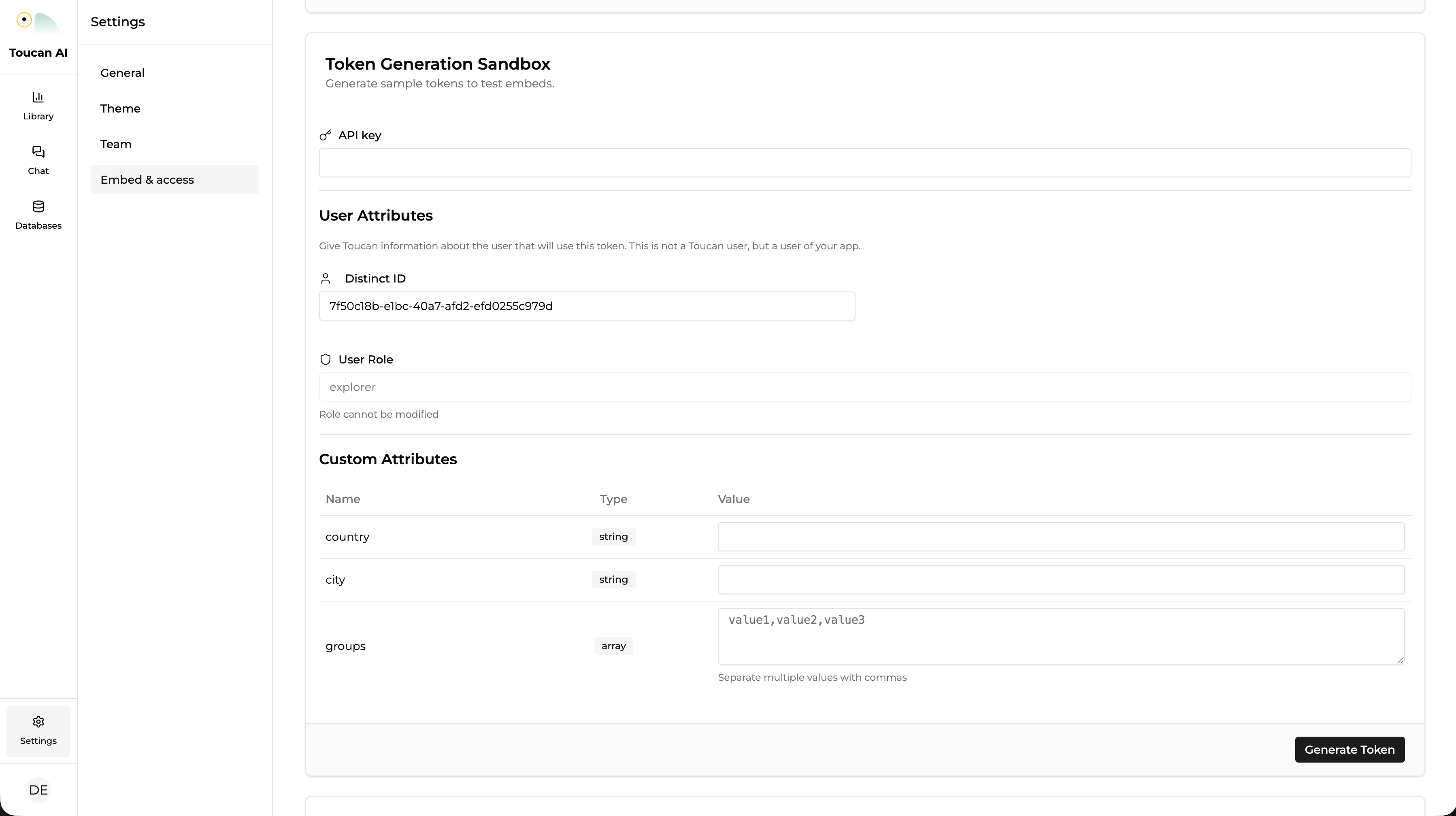
3. Find the Token Generation Sandbox Section
- Scroll down to the Token Generation Sandbox section within the Embed tab.
- This section allows you to generate tokens specifically for testing and embedding purposes.
4. Paste Your API Key
- In the Token Generation Sandbox, you will see a field to paste your API key.
- Copy your API key (generated in the previous tutorial) and paste it into this field.
5. Generate the Token
- If needed, complete Custom Attributes to test your Row Level Security
- After pasting the API key, click the Generate Token button.
- A sandbox token will be generated and displayed on the screen. This token is valid for a limited time (1 hour by default) and can be used to test embedding visualizations or dashboards.
6. Copy and Store the Token
- Copy the token to use it for embedding dashboards and testing your integrations.
- Store the token securely in your password manager for future use.
Conclusion
Congratulations! You have successfully generated a sandbox token in Toucan AI. This token can now be used to test embedding dashboards and charts within your application in a safe environment before going live in production.
Suggested Next Steps: Token Introspection!